The Nano Banana 2 Handbook
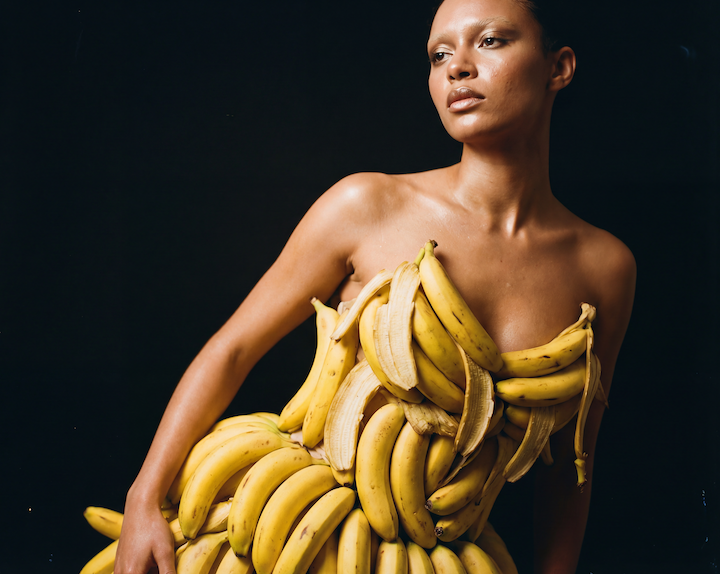
Google's Gemini 2.0 Flash Image, known around here as Nano Banana 2, is faster, cheaper, and according to our collaborator Brian from Litany of Ignition, "significantly better at riblets." We asked Brian to put it through its paces on OpenArt and document what he found. The result is a 12-minute tutorial packed with tips, prompts, and a surprising number of Applebee's visits. Here is the full breakdown.
NB2 vs. Nano Banana Pro: The honest comparison
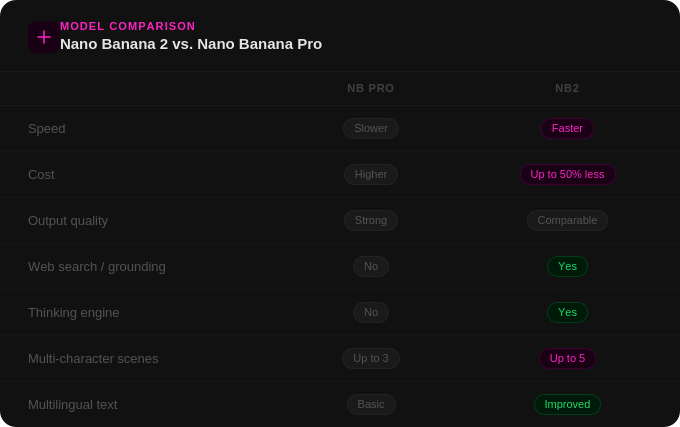
Behind the banana, there is now a dynamic thinking engine capable of reasoning through complex prompts, pulling real information from the web rather than hallucinating it, and analyzing image inputs to maintain character consistency across generations. That is what makes NB2 genuinely different from its predecessor — not just a speed and cost improvement, but a new category of capability.
Tip 1: Don't edit inside the editing interface
Brian's first tip is also his most immediately actionable: skip the editing interface entirely. Instead, drag your base image directly into the visual reference window and structure your prompt like this:
"Edit image one based on the prompt. [Your edit here]."
On OpenArt, this approach gives NB2 direct access to the image and consistently produces cleaner, more precise edits. Brian also recommends bumping your resolution up to 4K before generating. It is not the same as upscaling, but it gives the model significantly more pixel space to work with on fine details like text, name tags, or small props. This becomes especially important when you are prompting anything with intricate detail work.
Tip 2: The character sheet prompt
This was the most requested item in the comments section. Brian pinned the full prompt after the video went up, and here it is:
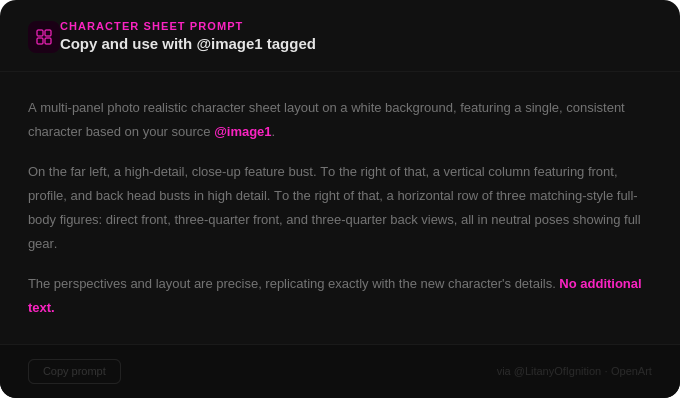
Two things to keep in mind when using this prompt. First, always manually tag your reference image using @image1 — the prompt will not work without it. Second, NB2 can accept up to five character sheets tagged into the same scene, which Brian stress-tests later in the video with some genuinely impressive results. It is worth noting that both NB2 and Nano Banana Pro handle this prompt well, though NB2 has the advantage of supporting more simultaneous character inputs.
Tip 3: Real-world grounding through Google Search
This is where NB2 pulls most clearly ahead of its predecessor. The model can perform a web search when it determines it does not have enough information to complete a task, which opens up a genuinely new category of prompting. Brian tested this by photographing grocery store ingredients and asking NB2 to generate recipe infographics without telling it what the recipe should be. The model had to identify the ingredients from the photos, look up a relevant recipe, and render everything as a visual layout.
For the lasagna test, he used 12 separate reference images. OpenArt accepts up to 14.
The results were largely impressive, though Brian had notes:
"Many of the outcomes were a bit light on instructions as to the ingredient amounts, more or less implying that I should just dump entire boxes or jars of ingredients in the bowls, layer everything, and enjoy my yolo lasagna."
The practical takeaway is that web-grounded prompting works well for reference-heavy tasks where you want the model to synthesize information across multiple inputs. It is meaningfully better than NB Pro at this kind of task, even if the outputs occasionally require some interpretation.
Tip 4: Multilingual text generation
NB2 ships with improved multilingual text rendering, which Brian tested by asking it to translate his cheesecake infographic into Japanese. The translation rendered correctly, though Brian is honest about the limits of his ability to verify accuracy. He has invited Japanese speakers to weigh in via the comments. The verdict is still pending.
Tip 5: Spatial reasoning in complex scene edits
Brian brought NB2 to Times Square, photographically speaking, and asked it to remove all the LED billboards and signage from a rainy night shot. What makes this test genuinely interesting is the difficulty of what the model has to do: it must remove the signs, extrapolate what the buildings look like underneath them, and recalculate the lighting, since most of the illumination in a wet Times Square shot is reflected bounce light from those very signs. That is a significant amount of spatial and physical reasoning happening in a single generation.
The results are impressive, with some expected imperfection toward the center of the frame. Brian followed that test with a sequence of additional edits, removing pedestrians, switching to a sunny day, and then converting the scene to a blizzard. That last one worked well enough that he declared he can now generate winter B-roll without leaving the house.
Tip 6: Multi-character scenes with up to five consistent characters
The most ambitious test in the video. Brian generated five distinct character sheets and tagged all of them into a single Applebee's dining scene, asking for varied camera angles while the characters ate ribs. Most characters held up consistently across generations. The retro housewife was the trickiest, which Brian attributes to the heightened sensitivity our brains have to slight inconsistencies in realistic-looking human faces.
A few unexpected things surfaced along the way: the robot had a persistent desire to resemble Bender from Futurama despite no such prompt, and some outputs showed floating character sheet artifacts. But the unambiguous highlight came when NB2 invented names for all five characters without being asked: Blonde Ambition, Steel Resolve, The Gentle Toad, Mew Pawsome, and Skull Rider. Brian's verdict: "I take back all criticism. This is the best imaging model ever."
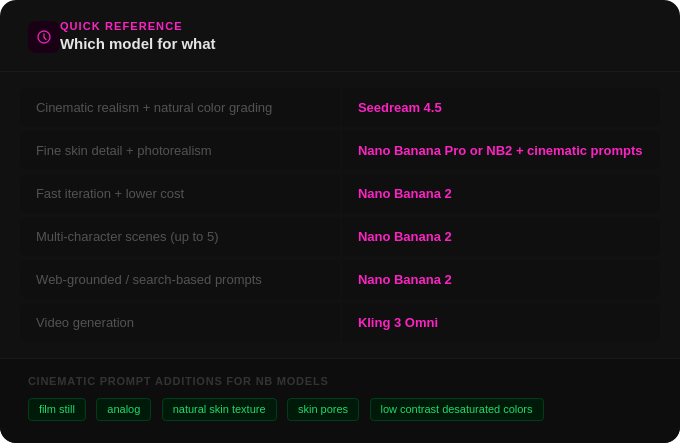
Quick reference: which model for what
The bottom line
NB2 is a meaningful upgrade over Nano Banana Pro, particularly for image editing, web-grounded prompts, and multi-character consistency. The thinking engine underneath makes it capable of things its predecessor simply could not do, and it does them faster and at a lower cost. It is not a perfect tool, but it is a genuinely powerful one, and it is available on OpenArt right now.
Brian's tutorial is worth watching in full. One thing the comments consistently praised was his willingness to show where the model produces unexpected or imperfect results, not just the polished outputs. That honesty gives you a much more realistic picture of what to expect when you sit down to use it yourself.

.png)